Sorry about this. I just remembered that it's iPad day in the US and decided to make a quickie post on it.
Are you ready?
Here it comes...
I'm not getting one!
Really. Nothing against the iPad, but I don't need one. I have a computer around me at almost all times, I don't travel that much, and I don't have however much money it costs to blow on something I don't need.
This has exposed me as a non-fangirl, I'm sure. To the true fanboys-and-girls out there, please save the trolling and hate-commenting. I'm sure there are bloggers out there who really do hate Apple; go pester them.
Saturday, April 3, 2010

The Scanner... Again...
Well. My scanner seems to be cooperating with Image Capture, at least... Perhaps it was a case of turn-off-leave-off-turn-back-on-after-a-week. Perhaps. I also had a computer update and restart, so that might have helped. In any case, the darn thing is working again.
It seems to be working in Preview, as well.
Now we'll check System Preferences...
Yep. I think the software update fixed it.
See, I feel slightly ridiculous for not bothering to restart my computer. I don't know that it would have helped, but I still should have checked. Shows you what sort of tech-savvy person I am.
Oye.
Related Posts:
Apple and HP: The Unholy Union
Image Capture to the Rescue
Temporary Fixes
It seems to be working in Preview, as well.
Now we'll check System Preferences...
Yep. I think the software update fixed it.
See, I feel slightly ridiculous for not bothering to restart my computer. I don't know that it would have helped, but I still should have checked. Shows you what sort of tech-savvy person I am.
Oye.
Related Posts:
Apple and HP: The Unholy Union
Image Capture to the Rescue
Temporary Fixes
Sunday, February 28, 2010
Temporary Fixes
Well, dear readers, it would seem that Image Capture was only to the rescue for a little bit. My printer is bloody well determined that I not scan anything, which is making life kind of difficult right now. In a vain attempt to force the thing to work, I opened the scan functions in Preview, System Preferences, and Image Capture... All to no avail. If any of you have found a new fix, by all means share it...
***Please see the next post.
***Please see the next post.
Tuesday, February 23, 2010
Since everyone else is putting up posts about Google, I figured I'd write something. Can't be left behind!
I'll include some links to pertinent blogs about Google. Lifehacker has a pretty coherent one, and "Harriet Jacobs" (the link is to a Gizmodo post, since the blog itself is protected) has some good reasons to be angry.
I, however, am not angry at Google. I don't have an android phone that hasn't received an update since it was released, I don't have any creepy stalker exes that use Google Buzz to find me, and, to be quite honest, this blog is working out pretty well for me. I like having things in one place. If I had an android phone, it would be even more convenient for mail and such.
NOTE: I don't actually have a smartphone. It's very sad, but since I can (and do) take my computer everywhere, I don't really need a smartphone. Want, yes. Everyone has to drive out in the boonies, where there are no internets, and I don't actually take my computer to the store with me. But! There is hope for me. I have T-Mobile, so I might end up with the famed Nexus One when my contract is up for renewal. Sure, T-Mobile's reception is less than optimal, but it's fairly cheap. Or it was when I first signed up. Don't be hating.
Back to Google. I have a plethora of gmail accounts (different accounts for different purposes, some dignified and one that a friend made for me) that all link back to my main email, a Picasa account for two of those (again, one for public view and one for a different online persona [I promise I'm not a creep. That did sound creepy.]), I think I have a Google Voice account somewhere, a Wave account because my friend sent me an invite, a few documents saved in Google Docs- handy when working with Windows users, since Word doesn't like talking to Pages documents- and a few blogs on Blogspot. I have a homepage with iGoogle, a Google Reader account, and I have Google Chrome as one of my browsers. Not my main browser, but it's not bad.
And Buzz. Buzz installed itself on my gmail account, although it did give me the option to opt out. I think. The day it came to me, I was a little fuzzy. But, since I could care less about social networking- none of my friends are that into it, and if they really want to tell me something, they text or IM me- I ignored it. Then I went on Gizmodo to kill some time and saw the post I linked to above, the one from the Harriet Jacobs' blog. While I disapprove of profanity in general, I couldn't really say anything about hers. I wouldn't let anyone under the age of 16 read it, but if anyone has a right to swear at Google, it's her.
Now that the righteous fury against Google is beginning to subside, the tongue-in-cheek posts are starting to come out. There's always a cycle, by the way. Fury, sarcasm, tongue-in-cheek, reason, jokes, apathy. It happens all the time with Apple and Microsoft. Now it's Google's turn to join the great companies. Here's a great tongue-in-cheek post from Gizmodo. (The Lifehacker link is a fair example of the reason stage. Hopefully this post is, too.)
The tongue-in-cheek phase is my favourite. I love watching the reasonable people put up amusing, intelligent posts only to be flamed relentlessly by fanboys and furious nay-sayers. Aside from the amusing interactions in the comments, the posts themselves are fun to read. Only with such catastrophes does such great wit show itself.
In summary, I think that Google will do alright, even with the Buzz fiasco, since they have a solid position as a search engine and email provider. Picasa isn't the greatest thing ever, but it's fine for casual photographers who want to share photos with friends and family without sending ten million attachment-loaded emails. The Chrome browser is decent, and the Chrome OS, if not game-changing, is promising. Google Docs is handy and even integrated right into my gmail account, hey! Buzz will almost inevitably fail, since Twitter and Facebook are so ingrained into society. "What's this "Buzz" thing?" "Oh, it's Google's facebook-y twitter thing." If it doesn't fail, it will probably live quietly on the side, used by the Google Faithful until the Next Great Thing comes out.
(By the way, almost all the non-sentence-starting words that I've capitalised are probably copyrighted, registered, or trademarked. But whatever.)
I'll include some links to pertinent blogs about Google. Lifehacker has a pretty coherent one, and "Harriet Jacobs" (the link is to a Gizmodo post, since the blog itself is protected) has some good reasons to be angry.
I, however, am not angry at Google. I don't have an android phone that hasn't received an update since it was released, I don't have any creepy stalker exes that use Google Buzz to find me, and, to be quite honest, this blog is working out pretty well for me. I like having things in one place. If I had an android phone, it would be even more convenient for mail and such.
NOTE: I don't actually have a smartphone. It's very sad, but since I can (and do) take my computer everywhere, I don't really need a smartphone. Want, yes. Everyone has to drive out in the boonies, where there are no internets, and I don't actually take my computer to the store with me. But! There is hope for me. I have T-Mobile, so I might end up with the famed Nexus One when my contract is up for renewal. Sure, T-Mobile's reception is less than optimal, but it's fairly cheap. Or it was when I first signed up. Don't be hating.
Back to Google. I have a plethora of gmail accounts (different accounts for different purposes, some dignified and one that a friend made for me) that all link back to my main email, a Picasa account for two of those (again, one for public view and one for a different online persona [I promise I'm not a creep. That did sound creepy.]), I think I have a Google Voice account somewhere, a Wave account because my friend sent me an invite, a few documents saved in Google Docs- handy when working with Windows users, since Word doesn't like talking to Pages documents- and a few blogs on Blogspot. I have a homepage with iGoogle, a Google Reader account, and I have Google Chrome as one of my browsers. Not my main browser, but it's not bad.
And Buzz. Buzz installed itself on my gmail account, although it did give me the option to opt out. I think. The day it came to me, I was a little fuzzy. But, since I could care less about social networking- none of my friends are that into it, and if they really want to tell me something, they text or IM me- I ignored it. Then I went on Gizmodo to kill some time and saw the post I linked to above, the one from the Harriet Jacobs' blog. While I disapprove of profanity in general, I couldn't really say anything about hers. I wouldn't let anyone under the age of 16 read it, but if anyone has a right to swear at Google, it's her.
Now that the righteous fury against Google is beginning to subside, the tongue-in-cheek posts are starting to come out. There's always a cycle, by the way. Fury, sarcasm, tongue-in-cheek, reason, jokes, apathy. It happens all the time with Apple and Microsoft. Now it's Google's turn to join the great companies. Here's a great tongue-in-cheek post from Gizmodo. (The Lifehacker link is a fair example of the reason stage. Hopefully this post is, too.)
The tongue-in-cheek phase is my favourite. I love watching the reasonable people put up amusing, intelligent posts only to be flamed relentlessly by fanboys and furious nay-sayers. Aside from the amusing interactions in the comments, the posts themselves are fun to read. Only with such catastrophes does such great wit show itself.
In summary, I think that Google will do alright, even with the Buzz fiasco, since they have a solid position as a search engine and email provider. Picasa isn't the greatest thing ever, but it's fine for casual photographers who want to share photos with friends and family without sending ten million attachment-loaded emails. The Chrome browser is decent, and the Chrome OS, if not game-changing, is promising. Google Docs is handy and even integrated right into my gmail account, hey! Buzz will almost inevitably fail, since Twitter and Facebook are so ingrained into society. "What's this "Buzz" thing?" "Oh, it's Google's facebook-y twitter thing." If it doesn't fail, it will probably live quietly on the side, used by the Google Faithful until the Next Great Thing comes out.
(By the way, almost all the non-sentence-starting words that I've capitalised are probably copyrighted, registered, or trademarked. But whatever.)
Sunday, January 17, 2010
Image Capture to the Rescue
For all of you that have been struggling to get your scanner working, try using Image Capture. Many sites advocate using System Preferences "Print and Fax" pane or Preview's "import image" function, but neither of those worked for me. If you have your new drivers from the apple site installed (see previous post for link), this should work for you. If it doesn't, well, try the others, then sue HP.
To find Image Capture, I used spotlight. Some of you clever people might have it's actual location, but I don't. It will ask you to select a device, the tells you to press "scan" to start scanning. Unlike Preview and the print and fax pane, this one actually recognised the scanner, and started scanning right away.
I was pleased.
Note: the page that told me about Image Capture can be found here.
One more thing- You will probably want to uncheck the "Detect Separate Items" box.
Related posts:
Apple and HP: The Unholy Union
Temporary Fixes
The Scanner... Again...
To find Image Capture, I used spotlight. Some of you clever people might have it's actual location, but I don't. It will ask you to select a device, the tells you to press "scan" to start scanning. Unlike Preview and the print and fax pane, this one actually recognised the scanner, and started scanning right away.
I was pleased.
Note: the page that told me about Image Capture can be found here.
One more thing- You will probably want to uncheck the "Detect Separate Items" box.
Related posts:
Apple and HP: The Unholy Union
Temporary Fixes
The Scanner... Again...
Sunday, January 10, 2010
HP and Apple- The Unholy Union
The other day, I tried to use my HP C6480 all-in-one (printer, scanner, copier) that came with my computer. Rather, I tried to use the scanner. The printer works fine, and I believe that the copier would work fine as well. I make few to no copies, however, so I shan't speak of that function. This post probably could have been written much sooner, but I hadn't tried to use my scanner since before Snow Leopard.
On the scanner, there is this nifty little touchscreen that used to let me scan or copy (and even print from a memory card in the printer itself) without needing to deal with the computer as a middleman. No more. The touchscreen is still there, but the computer doesn't like it. In fact, the computer refuses to recognise my scanner altogether.
This frustrated me. Therefore, after exhausting the offline support (including the manual, which only had trouble-shooting for Windows Vista), I turned to the all-knowing Internet. The Internet directed me to the HP website, which informed me, as if I didn't already know, that Snow Leopard has the printer files on the installation disc! There is no need for the HP software from the disc. I should not try to re-install the software- it won't work. I harrumphed and went to bed.
The next day, a friend was over. The discussion somehow turned to my stubborn printer, and he told me that a friend of his had the exact same problem. The problem was that the printer drivers needed to be downloaded- although the software tells me that there are no updates necessary, they are lying. They don't even know what they're talking about, since they're not designed to speak with Snow Leopard (and vice versa).
So today, finding myself with free time on my hands, I searched the Internet again- this time more specifically. "HP printer drivers for snow leopard" pulled up a blog whose author had the same problem. They informed me that the drivers had not actually been on the Snow Leopard disc and directed me to the apple support page, where I found the printer driver updates. Naturally, I tried the newer-looking one (1.1.1), but it didn't like my hard drive. So I went with the other one, which had no numbers in the name (shocking!). I managed to install this one with minimal hiccups.
In case you were wondering, I'm doing this as I type. The installation was practically a dream, but the system preferences "Print and Fax" pane still can't find the printer. Hhhm. Preview still refuses to "import from scanner", and I don't have HP software from which to try.
I'll keep you posted, imaginary readers. If you have any tips, let me know.
***See the next post, "Image Capture to the Rescue", for the solution.
On the scanner, there is this nifty little touchscreen that used to let me scan or copy (and even print from a memory card in the printer itself) without needing to deal with the computer as a middleman. No more. The touchscreen is still there, but the computer doesn't like it. In fact, the computer refuses to recognise my scanner altogether.
This frustrated me. Therefore, after exhausting the offline support (including the manual, which only had trouble-shooting for Windows Vista), I turned to the all-knowing Internet. The Internet directed me to the HP website, which informed me, as if I didn't already know, that Snow Leopard has the printer files on the installation disc! There is no need for the HP software from the disc. I should not try to re-install the software- it won't work. I harrumphed and went to bed.
The next day, a friend was over. The discussion somehow turned to my stubborn printer, and he told me that a friend of his had the exact same problem. The problem was that the printer drivers needed to be downloaded- although the software tells me that there are no updates necessary, they are lying. They don't even know what they're talking about, since they're not designed to speak with Snow Leopard (and vice versa).
So today, finding myself with free time on my hands, I searched the Internet again- this time more specifically. "HP printer drivers for snow leopard" pulled up a blog whose author had the same problem. They informed me that the drivers had not actually been on the Snow Leopard disc and directed me to the apple support page, where I found the printer driver updates. Naturally, I tried the newer-looking one (1.1.1), but it didn't like my hard drive. So I went with the other one, which had no numbers in the name (shocking!). I managed to install this one with minimal hiccups.
In case you were wondering, I'm doing this as I type. The installation was practically a dream, but the system preferences "Print and Fax" pane still can't find the printer. Hhhm. Preview still refuses to "import from scanner", and I don't have HP software from which to try.
I'll keep you posted, imaginary readers. If you have any tips, let me know.
***See the next post, "Image Capture to the Rescue", for the solution.
Sunday, January 3, 2010
Cameras
This is technically not something that you "need to know", but I don't care. I recently became in need of a camera- cheap, hard-to-break, easy-to-use, point-and-shoot sort of thing (I can use more phrases that consist of three words stuck together with hyphens, if you like).
As any sane person would, I did some research. I hadn't purchased a camera since my old (now broken) film camera about, oh, 7 or 8 years ago. I've used digital cameras, even owned them, but they were all given to me by the previous owner. Therefore, I consulted the almighty internets to find out what I wanted.
I found that there are lots of nice things that I really don't need. There are also a lot of nice cameras that I don't need. I googled by price (low to high) to find out what was on the inexpensive end of the spectrum, and I found the Nikon "Cool pix" line (Spoiler- I didn't buy this one). It has plenty of nifty features, such as "smile recognition". I'm fairly certain that it would have been a good camera.
However, I also found the Samsung SL30. This one also had the smile recognition feature, which I was become attached to based on friends' cameras. The SL30 boasts 10.2 megapixel shots, which is actually kind of wimpy in comparison with, ah, a lot of other cameras. However, my above criteria included cheap. This was the least expensive- but still decent- camera I could find.
My camera is black. I believe there were other colours available.
It's really not that well-made. It has, however, been dropped on concrete while it was snowing. Aside from the batteries popping out and getting wet, it was fine. (Insider tip- wet batteries don't work. At all. Let them- and the battery compartment- dry thoroughly, at least overnight)
One startling discovery was that the camera did not come with a memory card. At all. It took about four pictures before flatly refusing to do more. Fortunately, I had a microSD card and adapter that came with a phone.
Also, the camera does not speak to OSX. However, the SD card can be placed in the SD card slot in my macbook pro. This makes it simple to put the pictures into the photo editing/viewing programme of your choice- either tell the programme to import them from the "Device" or drag-and-drop the files into the library, depending on the programme.
The actual pictures, for non-professional purposes, are quite satisfactory. The smile recognition works well, and the photos are less blurry than some hand-held point-and-shoots to which I am accustomed. As always, turning on the flash makes the pictures clearer and cleaner, but some fun effects can be achieved by turning it off. For example, a Christmas decoration hanging in my room made a bold contrast with the walls, and the fuzzy photo achieved without the flash emphasised this contrast.
The camera is by no means the best point-and-shoot, but I don't need the best. It works for a hardy camera to carry around and whip out when something photo-worthy happens.
As any sane person would, I did some research. I hadn't purchased a camera since my old (now broken) film camera about, oh, 7 or 8 years ago. I've used digital cameras, even owned them, but they were all given to me by the previous owner. Therefore, I consulted the almighty internets to find out what I wanted.
I found that there are lots of nice things that I really don't need. There are also a lot of nice cameras that I don't need. I googled by price (low to high) to find out what was on the inexpensive end of the spectrum, and I found the Nikon "Cool pix" line (Spoiler- I didn't buy this one). It has plenty of nifty features, such as "smile recognition". I'm fairly certain that it would have been a good camera.
However, I also found the Samsung SL30. This one also had the smile recognition feature, which I was become attached to based on friends' cameras. The SL30 boasts 10.2 megapixel shots, which is actually kind of wimpy in comparison with, ah, a lot of other cameras. However, my above criteria included cheap. This was the least expensive- but still decent- camera I could find.
My camera is black. I believe there were other colours available.
It's really not that well-made. It has, however, been dropped on concrete while it was snowing. Aside from the batteries popping out and getting wet, it was fine. (Insider tip- wet batteries don't work. At all. Let them- and the battery compartment- dry thoroughly, at least overnight)
One startling discovery was that the camera did not come with a memory card. At all. It took about four pictures before flatly refusing to do more. Fortunately, I had a microSD card and adapter that came with a phone.
Also, the camera does not speak to OSX. However, the SD card can be placed in the SD card slot in my macbook pro. This makes it simple to put the pictures into the photo editing/viewing programme of your choice- either tell the programme to import them from the "Device" or drag-and-drop the files into the library, depending on the programme.
The actual pictures, for non-professional purposes, are quite satisfactory. The smile recognition works well, and the photos are less blurry than some hand-held point-and-shoots to which I am accustomed. As always, turning on the flash makes the pictures clearer and cleaner, but some fun effects can be achieved by turning it off. For example, a Christmas decoration hanging in my room made a bold contrast with the walls, and the fuzzy photo achieved without the flash emphasised this contrast.
The camera is by no means the best point-and-shoot, but I don't need the best. It works for a hardy camera to carry around and whip out when something photo-worthy happens.
Thursday, November 12, 2009
Snow Leopard and Some Other Stuff
Snow Leopard first, then I shall digress.
I enjoy this new OS, although I had only had this computer for a month before it came out. As stated by several people, blogs, and Apple designers, the main benefits are "under the hood," i.e., load times are faster, etc. The "stacks" (the little icons on the dock that show you everything in them, like "Documents," "Applications," and "Downloads") are different- instead of throwing up a huge menu with all the little icons for programmes and files squashed onto the screen, the stacks have scrolling. Now, you have a limited view of your icons, but they are nice and visible.
I'm not too sure about this feature. I kind of miss the awe-inspiring feeling of seeing all the programmes cluttering up my hard drive in one glance, and it was harder to skip over the desired icon when they were all visible at the same time. I understand why this change was made (so that people with lots of programmes and small screens can see), but can I change it back? I don't have that many programmes...
When I installed the new operating system, I was informed that I needed to back up my computer. This involved going out and buying a hard drive, much to the astonishment of a friend who literally has hard drives laying around at his house. Neither of us will ever cease to be amazed by the number of hard drives in the other's house... A Windows-using family member also bought a hard drive, and made me even happier for my mac. The external hard drive came with a special programme for windows-running computers that syncs with the computer's hard drive and compresses the files, making it possible to view photos and such from the external hard drive... But very, very difficult. They couldn't view thumbnails or navigate from one photo to another without exiting the viewer and clicking a new icon. My external hard drive, however, simply made itself available to Time Machine, which neatly copied the computer's hard drive to a folder in the external hard drive, which I cleverly labeled "Time Machine Backups". The rest of the external hard drive holds things that I don't want cluttering up the hard drive of the computer, such as back-ups of my favourite DVDs. My back-up experience was quick and painless, while my unfortunate family member is still struggling with his over two months later.
So that's Snow Leopard and my experiences with it.
Now I rant about the irony of mac owners.
It's a funny thing, owning a macintosh computer. I am not a computer expert- I click things in a semi-logical progression, then google it if that doesn't work, then contact a more knowledgeable friend if that doesn't help, and then the friend goes through the same procedure. However. I am the owner of a mac who is considered knowledgeable in the fields of sciences and math, therefore I am a computer expert. I assist several fellow mac owners who bought their computers because a) "It's pretty," b) "My boyfriend told me to," and c) "I heard they were the best, but I don't really know how to use them." I entertain serious doubts about the intelligence of these people. Yes, they made a rather good choice (although OS X is not for everyone, just as Microsoft OS's are not for me), but they didn't even read the pretty little booklet that comes with the thing!
I had to show someone how to use exposé. She was using spaces to store all her open applications, and asked me if there was a shortcut... "Yeah. Four-finger swipe on your trackpad." She was entranced by the possibilities, reminding me that not everyone hits all the buttons to see what they do as soon as they get a new computer. If she had, she would have found this mac institution as soon as she hit the F3 key.
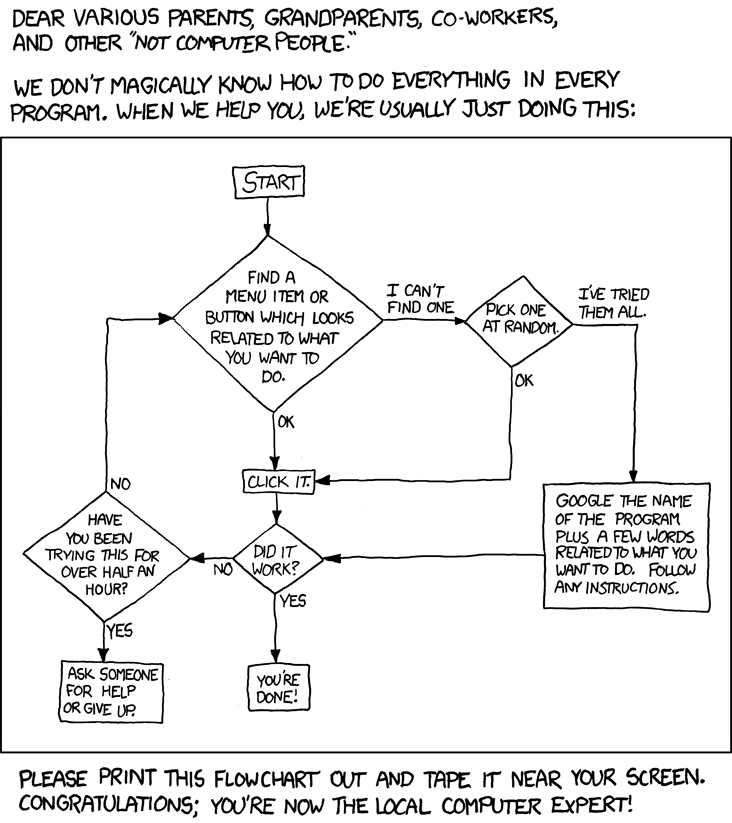
So this is something of a tribute to all of you who are kind of forced into this role of "tech support" for your friends and family and acquaintances and friends' friends... Enjoy this comic, then wish that you had the nerve to actually give it to someone.
Cheers,
Anikka
I enjoy this new OS, although I had only had this computer for a month before it came out. As stated by several people, blogs, and Apple designers, the main benefits are "under the hood," i.e., load times are faster, etc. The "stacks" (the little icons on the dock that show you everything in them, like "Documents," "Applications," and "Downloads") are different- instead of throwing up a huge menu with all the little icons for programmes and files squashed onto the screen, the stacks have scrolling. Now, you have a limited view of your icons, but they are nice and visible.
I'm not too sure about this feature. I kind of miss the awe-inspiring feeling of seeing all the programmes cluttering up my hard drive in one glance, and it was harder to skip over the desired icon when they were all visible at the same time. I understand why this change was made (so that people with lots of programmes and small screens can see), but can I change it back? I don't have that many programmes...
When I installed the new operating system, I was informed that I needed to back up my computer. This involved going out and buying a hard drive, much to the astonishment of a friend who literally has hard drives laying around at his house. Neither of us will ever cease to be amazed by the number of hard drives in the other's house... A Windows-using family member also bought a hard drive, and made me even happier for my mac. The external hard drive came with a special programme for windows-running computers that syncs with the computer's hard drive and compresses the files, making it possible to view photos and such from the external hard drive... But very, very difficult. They couldn't view thumbnails or navigate from one photo to another without exiting the viewer and clicking a new icon. My external hard drive, however, simply made itself available to Time Machine, which neatly copied the computer's hard drive to a folder in the external hard drive, which I cleverly labeled "Time Machine Backups". The rest of the external hard drive holds things that I don't want cluttering up the hard drive of the computer, such as back-ups of my favourite DVDs. My back-up experience was quick and painless, while my unfortunate family member is still struggling with his over two months later.
So that's Snow Leopard and my experiences with it.
Now I rant about the irony of mac owners.
It's a funny thing, owning a macintosh computer. I am not a computer expert- I click things in a semi-logical progression, then google it if that doesn't work, then contact a more knowledgeable friend if that doesn't help, and then the friend goes through the same procedure. However. I am the owner of a mac who is considered knowledgeable in the fields of sciences and math, therefore I am a computer expert. I assist several fellow mac owners who bought their computers because a) "It's pretty," b) "My boyfriend told me to," and c) "I heard they were the best, but I don't really know how to use them." I entertain serious doubts about the intelligence of these people. Yes, they made a rather good choice (although OS X is not for everyone, just as Microsoft OS's are not for me), but they didn't even read the pretty little booklet that comes with the thing!
I had to show someone how to use exposé. She was using spaces to store all her open applications, and asked me if there was a shortcut... "Yeah. Four-finger swipe on your trackpad." She was entranced by the possibilities, reminding me that not everyone hits all the buttons to see what they do as soon as they get a new computer. If she had, she would have found this mac institution as soon as she hit the F3 key.
So this is something of a tribute to all of you who are kind of forced into this role of "tech support" for your friends and family and acquaintances and friends' friends... Enjoy this comic, then wish that you had the nerve to actually give it to someone.
Cheers,
Anikka
Saturday, August 29, 2009
Snow Leopard Coming Soon
Wednesday, July 29, 2009
Digression
This post has nothing to do with computers, nor does it relate to apple in any way. It's not even something that most people need to know. But for those of us out there who get sick of cutesy japanese demon cats, you are not alone. I found Hello Kitty Hell (strikethrough)after hours of searching the internets(/strikethrough) when User Friendly's "Laugh of the Day" arrived on my homepage.
For those of you who care, yes, I am perfectly aware that that was not real HTML back there with the strikethrough. And I don't care. I mean, if someone wants to tell me how to make the strikethroughs work, be my guest, but don't leave nasty messages mocking my lack of skill. Not seriously, in any case. If you annoy me too much, I can always delete your comments. I think. I can try, in any case, and if that doesn't work, then I'll just make more posts berating you.
For those of you who care, yes, I am perfectly aware that that was not real HTML back there with the strikethrough. And I don't care. I mean, if someone wants to tell me how to make the strikethroughs work, be my guest, but don't leave nasty messages mocking my lack of skill. Not seriously, in any case. If you annoy me too much, I can always delete your comments. I think. I can try, in any case, and if that doesn't work, then I'll just make more posts berating you.
Saturday, July 11, 2009
MacBook Pro
Yes, the day has finally come. I am now the proud owner of a 15" MacBook Pro.
It does take a bit of getting used to after using only Windows, but it's worth the acclimation stress. In fact, some things are simple enough that I look for the hard way to do them- the only way that Windows ever did them. Downloading things like Firefox and Picasa was a bit tricky, as I could click "Download" well enough, but was unable to make them run. It turned out that all I had to do was drag the icon into the "applications" folder and go...
It's lucky for me that I have a friend with a Mac, or I'd still be sitting here trying to get Firefox to run... But once things are explained, they are almost ridiculously easy to do. Drag and drop. Drag and drop. Go into settings to make clicking easier with the trackpad (Which I love, by the way. It is very responsive and almost makes a USB mouse unnecessary.).
Possibly my favourite feature is the keyboard. I shopped around, looking at less expensive PCs, and the main killer was the keyboard. Most of the laptops I played with had slow, sticky-feeling keyboards. Typing was a ponderous undertaking, like wading through molasses. This keyboard is light and "clicky" with its individual keys, and responds nicely to pressure.
One thing I wouldn't mind is more USB ports. This model only has two, along with an SD slot, headphone jack, etc. Two is a printer and a mouse. No room for jumpdrive or camera. An external USB device is soon to follow. Slightly less portable, but oh-so handy for those plugged-in moments.
I'm still working through the transfer of data from the desktop PC to the MacBook, so more on this is likely to follow!
That exclamation point was facetious, and if you didn't figure that out, you shouldn't be reading this. I will, however, permit you to keep reading if you have to look up "facetious" in the dictionary.
It does take a bit of getting used to after using only Windows, but it's worth the acclimation stress. In fact, some things are simple enough that I look for the hard way to do them- the only way that Windows ever did them. Downloading things like Firefox and Picasa was a bit tricky, as I could click "Download" well enough, but was unable to make them run. It turned out that all I had to do was drag the icon into the "applications" folder and go...
It's lucky for me that I have a friend with a Mac, or I'd still be sitting here trying to get Firefox to run... But once things are explained, they are almost ridiculously easy to do. Drag and drop. Drag and drop. Go into settings to make clicking easier with the trackpad (Which I love, by the way. It is very responsive and almost makes a USB mouse unnecessary.).
Possibly my favourite feature is the keyboard. I shopped around, looking at less expensive PCs, and the main killer was the keyboard. Most of the laptops I played with had slow, sticky-feeling keyboards. Typing was a ponderous undertaking, like wading through molasses. This keyboard is light and "clicky" with its individual keys, and responds nicely to pressure.
One thing I wouldn't mind is more USB ports. This model only has two, along with an SD slot, headphone jack, etc. Two is a printer and a mouse. No room for jumpdrive or camera. An external USB device is soon to follow. Slightly less portable, but oh-so handy for those plugged-in moments.
I'm still working through the transfer of data from the desktop PC to the MacBook, so more on this is likely to follow!
That exclamation point was facetious, and if you didn't figure that out, you shouldn't be reading this. I will, however, permit you to keep reading if you have to look up "facetious" in the dictionary.
Friday, June 12, 2009
Now It Is Certain
With Apple's realease of the new macbook and macbook pros, It became clear to me that a macbook would be out of the question. If I get a mac, it will be a 15" macbook pro. Nothing else is really worth it... The 13" pro is a good enough macbook, but if I'm to have a pro it should mean something. In reading the gizmodo reviews (and comments), I found that everything is basically good, but less elitist. I'm a scientist, so elitism runs deep in my blood... I almost hate to say it, but I would like very much to be able to be at least a little snobby in my choice of computer.
There were two sides, and I'm partial to both. On one hand, the price drop makes macbook pros infinitely more accessible to the general public. One doesn't need to be a high-salary professional to get a pro. On the other hand, the "dumbing down" of the pro line makes it mean less to have one.
I am not yet a high-salary professional, and I would have (somewhat grudgingly) purchased an aluminium macbook for starters. That is no longer available, however, so I turned to the macbook pros.
Everything that I've heard and read says that the 13" pros are slightly upgraded macbooks with a new name, and that does not interest me, despite my low budget. I've said it before, but I want a macbook pro to mean something special.
So it's a 15" for me, probably the 2.53 GHz. We'll see what the sumer brings, but I will hopefully have that elusive computer long before September.
All in all, I'm rather disappointed with Apple. They are undoubtedly still making good computers. But a macbook pro should be more than that.
There were two sides, and I'm partial to both. On one hand, the price drop makes macbook pros infinitely more accessible to the general public. One doesn't need to be a high-salary professional to get a pro. On the other hand, the "dumbing down" of the pro line makes it mean less to have one.
I am not yet a high-salary professional, and I would have (somewhat grudgingly) purchased an aluminium macbook for starters. That is no longer available, however, so I turned to the macbook pros.
Everything that I've heard and read says that the 13" pros are slightly upgraded macbooks with a new name, and that does not interest me, despite my low budget. I've said it before, but I want a macbook pro to mean something special.
So it's a 15" for me, probably the 2.53 GHz. We'll see what the sumer brings, but I will hopefully have that elusive computer long before September.
All in all, I'm rather disappointed with Apple. They are undoubtedly still making good computers. But a macbook pro should be more than that.
Saturday, April 18, 2009
iPOD nano
Well, I suppose it is time for me to review that iPOD that I bought in... March...
It was, in almost all ways, a vast improvement over my sansa. The nano is smaller, has more storage capacity, and is much easier to organise. iTunes is slow but easy to navigate, a major plus for this lazy, computer-illiterate person. It did take me a bit to get used to it (it's quite a switch from Windows Media Player), but now that I am used to it... It would be hard to go back.
So that's the "basic iPOD stuff." Now on to the "fourth-generation iPOD nano stuff."
As a woman, I have to say it... It's so pretty! All nice, shiny, and black... The glass screen is very pretty, and the size is a definite bonus. With a decent case (cheap online clearance!), I have no fear of breaking it when I bump into a counter at work, and it fits neatly in even my smallest, most impractical pockets. The case and the "hold" button (slider, really) conspire to make it impossible for me to mess things up while it's in my jacket pocket (provided, of corpse, that I actually put it on hold... Nothing is truly "foolproof," as us fools are so darn ingenious).
I was a bit leary of the shake-to-shuffle feature, but it turns out that I had nothing to fear... I only use this feature when I'm alone, since I look, I'm sure, like an idiot. It takes quite a bit of shaking to make it shuffle, thus the iPOD user must flail around violently with complete abandon to make the thing work.
Coverflow is a wonderful thing, provided one has album art. For the most part, I do. But, unfortunately, I still have some kinks to work out in iTunes from the file transfer that took place without my knowledge when I installed iTunes on my computer (it's a Dell... What can I say?). I had a bunch of duplicate files, files that appeared magically in iTunes from a "saved" folder that I did not know existed, and albums on which the album art refuses to show, despite repeated successful "get album art" endeavours.
The games were fascinating to me. The sansa did not have games, and I'm really not much of a gamer- a game of solitaire is good enough for me. Unfortunately, I despise the "draw three" feature of the iPOD solitaire (called "Klondike"), so that one is out. On the other hand, the marble maze game was a blast. I'm still in tutorials (I do have a job, you know...), but it's fun. Vortex, however, was a bit out of my realm. I can play that sort of game online... where the game holds still and has nothing to do with the exact position of my fingers.
Movies... Still working on that. I wanted to put Dune on it for a trip I took a few weeks ago, but oh, no, no free software for microsoft winduhs... Well, there is free software, but it kind of sucked... So movies might just have to wait for my macbook.
That, however, is not the fault of my iPOD. Stupid Dell...
In essence, I like my iPOD :)
It was, in almost all ways, a vast improvement over my sansa. The nano is smaller, has more storage capacity, and is much easier to organise. iTunes is slow but easy to navigate, a major plus for this lazy, computer-illiterate person. It did take me a bit to get used to it (it's quite a switch from Windows Media Player), but now that I am used to it... It would be hard to go back.
So that's the "basic iPOD stuff." Now on to the "fourth-generation iPOD nano stuff."
As a woman, I have to say it... It's so pretty! All nice, shiny, and black... The glass screen is very pretty, and the size is a definite bonus. With a decent case (cheap online clearance!), I have no fear of breaking it when I bump into a counter at work, and it fits neatly in even my smallest, most impractical pockets. The case and the "hold" button (slider, really) conspire to make it impossible for me to mess things up while it's in my jacket pocket (provided, of corpse, that I actually put it on hold... Nothing is truly "foolproof," as us fools are so darn ingenious).
I was a bit leary of the shake-to-shuffle feature, but it turns out that I had nothing to fear... I only use this feature when I'm alone, since I look, I'm sure, like an idiot. It takes quite a bit of shaking to make it shuffle, thus the iPOD user must flail around violently with complete abandon to make the thing work.
Coverflow is a wonderful thing, provided one has album art. For the most part, I do. But, unfortunately, I still have some kinks to work out in iTunes from the file transfer that took place without my knowledge when I installed iTunes on my computer (it's a Dell... What can I say?). I had a bunch of duplicate files, files that appeared magically in iTunes from a "saved" folder that I did not know existed, and albums on which the album art refuses to show, despite repeated successful "get album art" endeavours.
The games were fascinating to me. The sansa did not have games, and I'm really not much of a gamer- a game of solitaire is good enough for me. Unfortunately, I despise the "draw three" feature of the iPOD solitaire (called "Klondike"), so that one is out. On the other hand, the marble maze game was a blast. I'm still in tutorials (I do have a job, you know...), but it's fun. Vortex, however, was a bit out of my realm. I can play that sort of game online... where the game holds still and has nothing to do with the exact position of my fingers.
Movies... Still working on that. I wanted to put Dune on it for a trip I took a few weeks ago, but oh, no, no free software for microsoft winduhs... Well, there is free software, but it kind of sucked... So movies might just have to wait for my macbook.
That, however, is not the fault of my iPOD. Stupid Dell...
In essence, I like my iPOD :)
Saturday, April 4, 2009
Where Is Serena Butler When We Need Her?
Those of us who believe that the machines will develop artificial intelligence and become "thinking machines" now have proof. They are taking over the world... one defenceless old lady at a time. It's not just our computers that are planning to take over the world, torture all humans, and enslave those who survive, it's the so-called "helpful" machines as well.
And it's not just Frank Herbert that foresaw this menace, Battlestar Galactica shares his suspicions. This article proves that their fears are not unfounded! We need Serena Butler, the heroine of the Butlerian Jihad. She inspired humanity to rebel against the thinking machines, to fight them despite the overwhelming odds against them.
I think that I'll smash my computer tonight. It's not worth the risk.
Or I would, if I wasn't addicted to solitaire. There's nothing quite like getting beat by a computer at a game that is designed to match your wits against a deck of (usually poorly shuffled) cards. The euphoria brought on by "beating" the sadistic thinking machine is worth the risk of having such a dangerous thing in my home.
And besides being addicted to solitaire, I'm a fan of wasting time online. How could I do that without a computer?
Serena would be disappointed, but she's a work of fiction. My solitaire games and I should be safe from the jihad.
And it's not just Frank Herbert that foresaw this menace, Battlestar Galactica shares his suspicions. This article proves that their fears are not unfounded! We need Serena Butler, the heroine of the Butlerian Jihad. She inspired humanity to rebel against the thinking machines, to fight them despite the overwhelming odds against them.
I think that I'll smash my computer tonight. It's not worth the risk.
Or I would, if I wasn't addicted to solitaire. There's nothing quite like getting beat by a computer at a game that is designed to match your wits against a deck of (usually poorly shuffled) cards. The euphoria brought on by "beating" the sadistic thinking machine is worth the risk of having such a dangerous thing in my home.
And besides being addicted to solitaire, I'm a fan of wasting time online. How could I do that without a computer?
Serena would be disappointed, but she's a work of fiction. My solitaire games and I should be safe from the jihad.
Friday, March 13, 2009
Close Enough To Spit My Gum On
There are quite a few things/events that are close enough to spit my gum on... Or that feel like they should be but aren't. One of the former is getting an iPod nano, a 6GB upgrade from my SanDisk sansa. Never having had an iPod and having heard mixed reviews about certain models, I was leery of getting one. Hence the sansa. But the rave reviews that my like-minded friends have given me about iPods coupled with the swiftly deteriorating condition of my sansa (it has two cracks in the screen and is out of space) made me reconsider. Then, as something of a final straw, I discovered that the corporation that I work for has a deal with apple. Employees get discounts! That settled it. All I have to do now is wait until a little more money comes in from a non-working source so I can continue saving for my laptop while still getting that iPod.
The laptop is what ought to be getting closer. The problem is that, well, macs are expensive. Worth every penny, to be sure, but expensive nonetheless. This is why I work overtime. Boring, yes. Money-generating, yes. Worth it- duh.
Speaking of laptops, my cousin introduced me to a handy little site - http://www.notebookreview.com
It was a little confusing to navigate at first, and it's nigh
impossible to find your original post, but it can be done,
and was well worth the effort.
impossible to find your original post, but it can be done,
and was well worth the effort.
And now my computer seems to be trying to bug out on me,
so I shall post now.
so I shall post now.
Thursday, February 26, 2009
Depression
Good-bye, dear readers (even if you don't exist). I'm going to be trapped in a horrid little crevasse between two mountains for two days. There will be no internet for two days. And, to make matters worse, there is no cell phone reception in this crevasse. At all.
It was nice enough, once upon a time... Before the ability to text was given to me.
I'm going to die.
Pray for me, readers. If I don't die, I shall at the very least be suffering from severe withdrawal. Itchy thumbs. Twitchy fingers.
It really is a nice little crevasse. It's green, wet, and isolated. All excellent traits in a crevasse. But I doubt that I shall be able to get past the no-internet-no-reception issue...
At least I'll still be able to charge my phone and mp3 player...
Maybe I should try airplane mode. That would help with the thumb problem...
So Au Revoir. Until the happy day of return to civilisation...
Sunday, February 22, 2009
this is the initial burst of blogging
It is highly doubtful that I will continue blogging at this frenzied pace, but I figured that it's like orientation at work. You spend 9 hours staring at a computer screen on the first day. You are expected to remember everything that you read on said computer screen(s). Then you do it again the next day.
Employee orientation sucks. Plain and simple.
Really the only thing that I wanted to say was that... But I think that I will complain about my computer first.
It hates me.
It insists upon signing me out of chat on gmail whenever it gets nervous.
It hides interesting nuggets of knowledge, like how to change themes, from me.
It crashes Firefox at the drop of the proverbial hat.
And, to add insult to injury, it kills me at solitaire.
I'm pretty sure that it's a thinking machine- a stupid, clumsy, worthless thinking machine, but still. If you are stumped by my reference, then read the Dune series by Frank Herbert (and the spin-offs, too). That should help.
It's going to take over the world.
Sleep well...
Employee orientation sucks. Plain and simple.
Really the only thing that I wanted to say was that... But I think that I will complain about my computer first.
It hates me.
It insists upon signing me out of chat on gmail whenever it gets nervous.
It hides interesting nuggets of knowledge, like how to change themes, from me.
It crashes Firefox at the drop of the proverbial hat.
And, to add insult to injury, it kills me at solitaire.
I'm pretty sure that it's a thinking machine- a stupid, clumsy, worthless thinking machine, but still. If you are stumped by my reference, then read the Dune series by Frank Herbert (and the spin-offs, too). That should help.
It's going to take over the world.
Sleep well...
Saturday, February 21, 2009
pre-blog (a bad attempted pun on prologue)
This is my third blog. Ever. And will probably not be my last. The first two, um, stalled (ie, I stopped bothering with the posting nonsense that blogs require). The same will undoubtedly happen for this one.
Don't say I didn't warn you.
The blog's title has to do with my workplace.
And, if you need to know, I'll tell you.
It's simple.
Since you might need to know (here I am speaking to my non-existent readers), I will tell you that I am fond of bad puns that can be followed by sarcastic laughter. I am probably going to write about random stuff that alludes to random stuff, with the odd applicable thing thrown in.
My computer will be a likely topic, as I despise it. My search for an affordable macbook pro will be another.
And work. I will talk about work a lot, hopefully without actually mentioning the company or any details of what I do, because then I would have to kill you.
And killing is messy and expensive. I'd rather buy that macbook pro.
Don't say I didn't warn you.
The blog's title has to do with my workplace.
And, if you need to know, I'll tell you.
It's simple.
Since you might need to know (here I am speaking to my non-existent readers), I will tell you that I am fond of bad puns that can be followed by sarcastic laughter. I am probably going to write about random stuff that alludes to random stuff, with the odd applicable thing thrown in.
My computer will be a likely topic, as I despise it. My search for an affordable macbook pro will be another.
And work. I will talk about work a lot, hopefully without actually mentioning the company or any details of what I do, because then I would have to kill you.
And killing is messy and expensive. I'd rather buy that macbook pro.
Subscribe to:
Posts (Atom)